
AI FAQs
AI tools are transforming how we work, learn, and create. From drafting documents to designing visuals, these tools can help you work more effectively. However, using AI responsibly is essential to protect personal data, maintain academic integrity, comply with Queen Mary policies and applicable legislation.
This FAQ is designed to:
- Explain what Generative AI is and how to use it safely and effectively
- Describe our AI approach at Queen Mary and the governance
- What tools are approved at Queen Mary and how to access them
- How to suggest new tools
- Training available and how to get involved
We want this resource to stay useful and up to date. If you have a question that isn’t covered here, or notice something that needs updating, please complete this Feedback form. We will update these FAQs to keep pace with the changes in AI and Automation and how we as a University support it.
GenAI (Generative AI) tools are deep learning models trained on massive datasets (books, articles, websites, codebases and more) to generate ‘new’ and complex content. You can think of them like highly advanced predictive text systems, using statistical patterns in data to generate outputs that are not based on knowledge, comprehension, or reasoning, but on probability. This is the 'generative' aspect of GenAI - it can generate ‘new’ content based on the patterns that it has learned.
The way content is created means they have limitations, see What are the limitations of using GenAI tools & what should we be careful about?
For a list of AI tools we are using see What approved AI tools do we have available internally and how to access/download them?
Generative AI can produce content that looks convincing but may contain serious flaws. Use the Check, Challenge, Critique, Confirm approach to safeguard quality and compliance:
1. Check
- Verify basic accuracy and relevance with other authoritative sources, policies, and compliance requirements before using or sharing.
- Watch for inaccuracy: AI outputs can sound plausible but be incorrect, outdated, oversimplified, or incomplete.
- Check for fabricated sources: AI may create citations or references that look real but are fictitious.
2. Challenge
- Question assumptions, logic, and potential bias.
- AI reflects the biases in its training data and may amplify them, so ask: Could this disadvantage certain groups?
3. Critique
- Assess tone, clarity, and appropriateness.
- Consider lack of transparency: You cannot see which sources were used or how the output was generated.
Be mindful of privacy risks: Public tools may store inputs for future training. (See, What AI tool can I get started with? on using the built in Copilot to reduce these risks.)
✅ DO:
- Act ethically: Be transparent when AI helps you create content—acknowledge its use.
- Maintain your expertise - Use AI as a tool, not a replacement for professional judgment.
- Write more effective prompts (instruction to AI) - Clear, precise prompts lead to better results – learn how to write effective prompts in our Generative AI Fundamentals e-learning.
- Take ownership – You are accountable for everything you send; AI outputs need human judgement and critical thinking.
❌ DON'T:
- Input sensitive data Never enter special category personal data such as health information, biometric or genetic data, or any criminal offence data into any tool unless you have cleared this with the information “data owner” (either a person, or a department that has authority over a dataset).
- Use unmanaged AI tools for personal data - Do not enter any identifiable personal data into AI tools that are not approved and managed by Queen Mary. Check the AI software list on what data you can share with what tool.
- Share confidential research Never input unpublished findings or grant applications under review.
- Forget context - AI doesn't understand Queen Mary policies, legal requirements, or local nuances.
- Ignore copyright - AI may generate content similar or the same as to copyrighted works - check before sharing.
- Rush outputs - Always review and validate AI-generated content before use. This [PDF resource] can help you consider what to check.
Entering data, especially sensitive data, into AI tools may not be secure. These services often store user inputs and may reuse them to improve their models and generate predictions, content, recommendations, output, or decisions.
Any information shared could be retained and so may not be handled as per our compliance requirements regarding data protection legislation nor our institutional policies. This creates serious risks when handling student or staff data, or any other information covered by GDPR, unpublished research, confidential documents, grant applications.
Please see the AI software list to see what data you can share with which tool.
AI tools rely on large data centres that use a lot of electricity and water and most of this energy still comes from non-renewable sources. Training and running AI systems can produce significant carbon emissions and while a single query may seem small, the combined effect of millions of queries adds up quickly.
What we can do to help:
- Be conscious of usage: Use GenAI tools thoughtfully, balancing their benefits with the need to reduce unnecessary power consumption and the potential environmental impact.
- Prompt efficiency: Craft clear, precise prompts to reduce unnecessary iterations and save time and energy. Learn effective techniques in our Generative AI Fundamentals e-learning course.
- Reuse and refine: Instead of starting from scratch, build on previous outputs to minimise processing.
Queen Mary is committed to advancing a sustainable and equitable future and to mitigating the environmental impact, arising from the use of AI through:
- Sustainable infrastructure: Queen Mary is investing in energy-efficient data centres and innovative projects, such as using waste heat from AI-powered data centres to heat campus buildings, directly supporting our net zero carbon targets.
- Responsible procurement: All new enterprise AI solutions are evaluated for their environmental impact as part of our procurement and approval processes, in line with the Queen Mary’s sustainability policies.
Further reading:
- Queen Mary Sustainability Policy
- Centre for Excellence in AI in Education - Teaching with Generative AI: Balancing Innovation and Environmental Responsibility
At Queen Mary, we have the built-in version of Copilot. It is a free AI assistant available to all Queen Mary staff through our Microsoft 365 subscription. It offers greater protection of our data than other free tools as your data stays within the organisation and the data isn’t used for training purposes.
To access Copilot:
- Go to m365.cloud.microsoft/chat
- Log in with your Queen Mary IT account.
- To check that you are signed in to the Queen Mary version of Copilot—look for the green shield icon in the top-right corner of your screen.

The green shield icon confirms you’re using the Queen Mary secure version of Copilot. This means:
- Your data stays within Queen Mary’s Microsoft 365 environment.
- It meets institutional security and data protection requirements.
- Inputs are not stored or used for external model training.
If you don’t see the green shield, sign in with your Queen Mary credentials.
You can also access the built-in Copilot via Windows 11:
- Click the Copilot icon in the Windows taskbar (or write Copilot in the search box at the bottom of your screen and you will see the icon)
- You may see 2 similar apps, Microsoft 365 Copilot and Copilot.
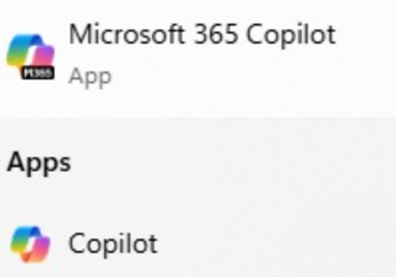
- It doesn’t matter which one you pick – however you MUST sign in with your QM account
If you also have Enterprise Co-pilot you will have a work/personal toggle button. Keep this on "Work" mode personal mode does not include the correct data protection and should not be used with any Queen Mary data.
Always check for the green shield to confirm you are logged in to your QM Account. See our short guide(pdf) on the Built-in Co-pilot for help and see What AI training and development courses are currently available for QM staff and how to access them? for training available.
What approved AI tools do we have available internally and how to access/ download them?
This AI software list provides tools that have been approved for use at Queen Mary and what kind of data you can share with them.
This list also provides you with links to download the tools or link to the software request catalogue. Software available through the catalogue will take around 10 days to be procured and made available on your supported device (where applicable).
If you have a supported device, you already have access to built in Copilot - see What AI tool can I get started with? for how to log in. Additionally, you have access to other free tools. See Can I use ChatGPT, Claude, Gemini or similar? for further information and how to protect data.
Never input the following data of identifiable individuals into any tools until you have cleared this with the information “data owner” (a senior individual responsible for a logical grouping of data):
- Health information
- Biometric or genetic data
- Any other special category personal data
- Criminal offence data
Why?
These categories are high risk requiring enhanced safeguards and formal review on a case-by-case basis, usually by completing a DPIA (Data Protection Impact Assessment).
Please refer to the AI software list to understand which free/public tools are approved for use at Queen Mary. Typically, they are fine to use for idea generation, drafting non-sensitive text, or learning about a topic, if you verify any output before sharing it and do not put in any Queen Mary data/information.
For anything beyond that, such as confidential research, unpublished findings, grant application, staff/student personal information, Queen Mary strategies, financial or commercial information you must use the built in Copilot (check you are you signed in see What AI tool can I get started with? to find out how) or another tool approved for use with QM data on the AI software list.
Why the distinction between built in Copilot and other publicly available tools?
Public Gen AI typically:
- Store your conversation history on external servers
- May use your inputs for model training (depending on settings)
- Aren't covered by institutional data processing agreements
Good practice:
- Before inputting text, remove all identifiable information
- Check outputs before sharing - AI frequently makes errors
- Opt out of training the models where possible, through tool settings
At Queen Mary, there are typically two main versions of Copilot available. One is the built-in version, the other is Enterprise Copilot 365 which has a cost, please see AI software list.
Both Built-in Copilot Chat and Enterprise Copilot version can have 365 in the name so it can be confusing.
If you see Copilot features inside Microsoft Office apps, you likely have Enterprise Copilot.

If you only have access to the web chat or do not see the “You have premium Copilot features enabled” message, you have Built in Copilot Chat (free version).
A summary of the key differences in the capability of each version follows:
|
|
Staff may experiment with free AI tools, for their own learning, only if the tool is used in a way that protects data privacy namely, no Queen Mary, personal or sensitive personal data is entered.
If you intend to use Queen Mary data (such as staff, student, research, or confidential information) with a free tool, you must submit the tool for approval via the Ideas portal – Software Request before you start using the tool in line with the IS07 Third Party Policy.
Why the restriction? Free tools rarely offer enterprise-level privacy, contractual guarantees, or data control. While they are safe for personal exploration, they are not safe for handling Queen Mary or personal data without formal approval.
If it is a “paid-for” tool please see the answer to A tool I want to use is not on the approved list so how do I introduce a new AI tool to Queen Mary?
All paid for tools go through a trial. All trials, even on a small scale, must be submitted for approval this ensures that any risks to Queen Mary’s data or systems are properly assessed and managed before use.
What you can do without formal approval:
- Make full use of approved tools for your work.
- Read vendor documentation and watch demonstrations.
- Discuss ideas and possibilities with colleagues
This approach helps protect both you and Queen Mary from unintended risks, and ensures that all technology use remains safe, compliant, and effective.
|
A tool I want to use is not on the approved list so how do I introduce a new AI tool to Queen Mary? To suggest a new tool, follow this process as per the IS07 Third Party Policy: a. Check if it's already under review –
b. If not listed, prepare your proposal - include:
c. Use the Ideas request process to submit a new request to the Ideas portal – Software Request (in line with the IS07 Third Party Policy) you will need to log in with your Queen Mary IT account details. d. Evaluation - Your proposal will be assessed on:
e. Decision timeline - 1-2 weeks for most tools. Depending on complexity and business criticality. After you submit your request, we will provide an estimate of the timeline f. Contact for support – Once you submit your request, you will receive an email or notification. You can add further comments via the submission page. |
The system and its new AI feature will need to be reviewed for data protection, security and strategic fit.
If you would like to use the new feature following experimentation, please submit a request via the Ideas portal – Software Request before using the new AI feature in a production environment.
This process helps safeguard Queen Mary’s data, ensures responsible adoption of AI and supports coordinated enterprise-wide AAA strategy (see section 16 for details of AAA programme.
Depending on the cost of the new feature, you will either need to submit your request via the Ideas portal – Software Request or follow the formal procurement process in line with the IS07 Third Party Policy . All IT purchases including software extensions and upgrades must comply with Queen Mary’s IT purchasing principles and procurement cost requirements.
Why is this necessary?
Paid extensions or upgrades need to be assessed for cost effectiveness and must demonstrate a return on investment. They may also introduce new risks or requirements that have not been assessed. The product and its new AI feature must undergo institutional AI checks, and procurement must be coordinated by ITS and the Procurement Team.
What do I need to do?
Talk to your Faculty Relationship Manager or if you are within Professional Services contact through raise a support ticket using our self service portal.
Submit a request via the Ideas portal – Software Request.
This ensures the new feature is reviewed for data protection, security, compliance and strategic alignment with Queen Mary’s enterprise AI strategy.
Cost thresholds apply: Depending on the value of the purchase, additional approvals and competitive tendering may be required. For full details, see the official IT purchasing principles and process and Procurement website.
Certain AI tools are prohibited due to legal, ethical, or security risks. You will find these on this list labelled Not approved
How are these decisions made?
The decision is based on a formal governance process led by a multidisciplinary group including Enterprise Architecture, Information Security, and Data Governance experts. This group evaluates each tool against Queen Mary’s Policies, Principles, Strategic alignment, GDPR compliance, and contractual obligations. High-risk proposals are escalated to senior oversight for review, and all decisions are documented for transparency.
Why:
- These tools record, store, and process meeting audio on external servers
- Data may be used to improve their models
- High risk of exposing confidential, personal, or research information
- Significant risk of data leaks
Does this discourage innovation?
Not at all. We actively encourage innovation through approved tools, vendor demos and Communities of Practice. If you have an idea or want to trial a new tool, you can submit it via the Ideas portal (in line with the IS07 Third Party Policy). This process ensures that innovation happens safely and responsibly, without exposing Queen Mary’s data to unnecessary risk.
Use alternative tools on the Queen Mary approved list or go to A tool I want to use is not on the approved list so how do I introduce a new AI tool to Queen Mary?
This could expose Queen Mary to increased risks such as data leaks. Some AI tools can store students’ personal data, staff records or intellectual property, research or sensitive organisational data outside of Queen Mary, beyond our control.
For instance, when an academic chooses to upload unpublished research onto an AI tool that isn’t approved for Queen Mary data, that tool can share that academic research with third parties or train a model with this newly found data. These AI tools may also breach research contracts or licensing terms, or even the law in relation to data processing and data storage. Finally, these tools may contain malware or spyware that can harvest Queen Mary’s data for malicious purposes.
Please refer to AI software list to see what tools are approved for what type of data.
We’ve curated all AI learning resources, guidance, and training on CPD training here
There are several groups you can join, each focused on different aspects of AI and innovation at Queen Mary.
AI in Research
Digital Environment Research Institute (DERI)
DERI leads cutting-edge AI and digital research as part of Strategy 2030.
- Collaborate on interdisciplinary projects tackling healthcare, sustainability, and AI ethics.
- Explore flagship initiatives like Living with Machines (with The Alan Turing Institute and British Library).
Join here: https://www.qmul.ac.uk/deri/discover-deri/join-deri/
AI in Education
Centre of Excellence for AI in Education (Queen Mary Academy)
A developing hub for promoting AI in teaching, pedagogic scholarship, and training.
- Shape future directions for AI-enhanced learning.
- Access resources and CPD opportunities.
Join here: General | QMA AI in Learning Community of Practice | Microsoft Teams
Technology Enhanced Community of Practice – AI Channel
Focused on practical AI applications in teaching and learning.
- Share best practices and success stories in education.
Join here: Artificial Intelligence | Technology Enhanced Community of Practice | Microsoft Teams
AI for Day-to-Day Productivity
Ideas Forum [CA1]
- Submit formal proposals for new tools or process automations via the Ideas Forum
QMA have developed a guide, an online course and communities of practice. Find out more at: Staff Guide to Generative AI - Queen Mary Academy
Start with the Ideas Forum. This is the formal route for introducing tools or initiatives not already approved. An outcome is normally provided within 7-10 days. The Ideas Forum Group meets once a week on a Thursday afternoon to discuss Ideas, and we will invite you to talk through your proposal.
If it’s a tool you want to introduce you can check on the AIIT (AI Innovation & Transformation) Innovation Hub on SharePoint to see if your idea or tool is already under review.
We’re moving towards using automation and artificial intelligence (AI) in a way that is joined up and consistent across Queen Mary. Rather than building lots of separate systems, we’ll focus on a small number of well-supported platforms that work well together. This approach helps us keep things consistent where we can, simple and secure.
Sometimes there will be special cases, such as unique academic or research needs where a different solution is necessary. These exceptions will be carefully assessed to ensure they remain sustainable and secure.
AI and automation initiatives will be prioritised based on impact and return on investment. Projects that deliver the greatest value or support organisational change will come first. This ensures our resources are directed toward initiatives that make a measurable difference.
By following these principles, we can deliver a consistent, secure and future-ready approach to automation and AI that supports the diverse needs of our academic community while allowing flexibility for justified niche requirements.
- Microsoft Enterprise Copilot – Unlike the built-in version of Copilot, the Enterprise version can securely use your documents, emails, and other content to summarise and rewrite documents, analyse data in Excel, build presentations in PowerPoint, manage your inbox in Outlook, and create meeting summaries in Teams. We’re assessing which groups of colleagues are likely to gain the most value from this version of Copilot. See question What approved AI tools we have available internally and how to access/ download them? for how to request software
- Academic integrity tools - AI detection and support for educators
- Research computing AI platforms - GPU (Graphics Processing Unit) clusters and ML (Machine Learning) frameworks for researchers
- Administrative automation opportunities in Professional Services (AI and Automation underpinned by our Application Strategy):
- Library AI services - Enhanced search, literature review support, and citation management
- AAA Programme [CA2] [PD3] – Delivering between now and mid-2027, this programme aims to embed artificial intelligence, automation and modern enterprise applications at the heart of our operations, education and research. The programme objectives are to drive digital transformation, enhance efficiency and service quality, foster innovation through centres of excellence and strengthen data governance and integration while ensuring the ethical and responsible use of AI. The anticipated outcomes include streamlined processes, improved experiences for staff and students, more agile and data-driven decision-making, a culture of innovation and demonstrable value through cost savings and new opportunities enabled by technology, all underpinned by a five-year strategic roadmap for AI and automation.
Delivery timeline: Major deployments are occurring in waves throughout 2025/6.
Agentic AI: Refers to systems capable of making decisions and acting autonomously based on user prompts, often employing sophisticated reasoning, goal-oriented behaviour, and iterative planning to address complex problems. These tools operate beyond basic question-and-answer functions and can generate outputs or take actions with other systems with minimal human oversight.
Artificial Intelligence or AI: refers to a branch of computer science dedicated to developing data processing systems that perform functions normally associated with human intelligence, such as reasoning, learning, adaptation, understanding of abstract concepts and knowledge. Artificial Intelligence (AI) technologies may be deployed for a variety of purposes, including but not limited to: task automation (through macros, chatbots, or robotic process automation); content generation (including the creation of images, videos, text, or music); human representation (for example, through deepfakes, synthetic voices, or digital personas); insight extraction (via machine learning models and data analytics); decision-making support (such as optimisation algorithms and decision trees); and human augmentation (including applications involving exoskeletons, avatars, or other assistive systems.
AI Ethics and Governance: AI ethics is a multidisciplinary field focused on optimising the beneficial impact of artificial intelligence while mitigating associated risks and potential adverse outcomes. The principles of AI ethics are operationalised through a structured AI governance policy, comprising regulatory guardrails designed to ensure that AI tools and systems operate safely and ethically.
AI Hallucinations refer to a phenomenon in which a large language model (LLM), frequently manifesting as a generative AI chatbot or computer vision tool, identifies patterns or objects that do not exist or are undetectable by human perception, thereby producing outputs that are either nonsensical or factually incorrect.
AI Tool(s): refer to all software applications, technologies, solutions, systems, modules, products and services that use (wholly or partially) AI algorithms to perform tasks associated with human intelligence. These include tools, models, data-processing, codes and other intelligent automation computational systems. The list is non-exhaustive. Note that most of our digital tools now incorporate or leverage AI in some form
Data owner: A data owner is either a person, or a department that has authority over a dataset, namely on how this data is collected, stored, shared and used. The Data owner has the power to decide who can access or use the dataset and under what conditions. They must ensure that any data used complies with Queen Mary’s policies, data protection legislation (GDPR), and ethical standards. This includes verifying that the data is accurate, anonymised, when necessary, free from bias and legally obtained. Data owners are also accountable for curating datasets in a way that they do not perpetuate harm, reinforce stereotypes or compromise the rights of people from whom the data was derived. Proper documentation, risk assessment, and impact evaluations should accompany any dataset intended to use in AI development.
IDEAS forum/process: The IDEAS Forum is composed of experts from across all areas of IT Services and serves as a consultative body to evaluate proposed ideas and solutions. Its primary role is to review new AI-related initiatives, approve purchase of AI tools provide guidance, and recommend appropriate next steps. The IDEAS Forum does not hold responsibility for the implementation or operational delivery of these services.
Generative AI (also known as GenAI): refers to advanced deep learning models capable of producing complex content, such as extensive narratives, high-resolution images, realistic video and audio, based on User-provided prompts and requests. Examples include ChatGPT, Microsoft CoPilot, Midjourney, DALL-E 2, Sora, Runway AI, Meta’s Make-A-Video. GenAI is a technology that can transform core higher education activities such as learning, teaching and research.
Institutional AI Systems: Describes AI systems which the university has designed, built, deployed and is operating. These are effectively AI capabilities embedded within institutional processes, services, or products. QMUL controls the design, implementation, governance, ongoing operation of the AI system and has accountability for its outputs. For example: Conversational AI (chatbots), Agentic AI (workflow automation, decision support), Machine Learning (predictive and analytical models).
Unmanaged AI Tools: Individuals using AI to assist their own work or study, whether institutionally licensed or personally accessed. QMUL doesn’t control the design, training, behaviour, or outputs of the AI tool. For example: Generative AI assistants (text, image, video, code), Research, summarisation and analysis tools, Learning and study support tools