
Helping students navigate online course areas
Why reading online is different - and what this means for your QMplus course
/filters:format(webp)/prod01/channel_389/technology-enhanced-learning-team/media/telt/images/pexels-yankrukov-7793740.jpg)
Person Typing on a Laptop
In the shift to more online learning, we know students don't read content in the same way they read a printed page - instead, they scan first, then engage. This isn't laziness, it's a well-documented human behaviour.
Research shows that students scanning online content tend to look for signals of relevance and purpose - headings, clear titles, and concise overviews help them decide what matters and where to focus their time. Long blocks of text or vague labels ("Week 3 - Read This") make it harder for students to orient themselves, increasing cognitive load and reducing meaningful engagement.
This article from the the Nielsen Norman Group, How People Read Online: New and Old Findings, highlights several important points for anyone creating content that students need to understand quickly and use effectively.
- People tend to scan in predictable patterns
- Most readers won't process every paragraph in full - they jump to the parts that stand out visually
- Effective online content is front-loaded (important information early), chunked (clearly separated sections), and signposted (with clear headings and labels)
What does this mean for my QMplus course?
Our QMplus Baseline Standards provide a framework that echo these insights and set a minimum expectation for a student-friendly course area. The idea is to ensure that every QMplus course area supports how students actually interact with online spaces - not how we hope they will.
1. Organise your course for clarity and flow
Why it matters: students scanning a course page need to know what each section contains and how to move through it. An unorganised list of links or files is invisible to a learner who is scanning for relevance.
QMplus Baseline Standards expectations
- Consider using the QMplus module exemplar so all modules share a familiar layout for students
- Structure your course in clearly labelled topics - by week, theme or activity - with logical titles that reflect the content
- Group related content into pages, books, or folders to reduce clutter and make navigation intuitive
2. Keep core module information front and centre
Students often spend too long looking for basic details - who to contact, where to find their timetable, how the module is assessed. Giving students this information in a predictable place improves their confidence in navigating the space.
QMplus Baseline Standards options
- Module name, code and credit value
- Module organiser details
- A link to the teaching timetable
- Use of the Module Information Block, which will automatically pull in key module details
3. Label and present content thoughtfully
The way content appears affects how easily students can find what they need. Some best practice from the baseline standards includes:
- Consistent and logical file naming - so students know exactly what each resource is before they click
- Fewer long lists of loose files - instead, group them in folders or books with meaningful headings
- A clear indication of what a resource is and when it should be used
Why it matters: students who use screen readers or mobile devices benefit hugely from this kind of clean structure.
4. Assessments should be easy to find, clear and transparent
Assessment information can't be buried down a page - it needs a dedicated place students can quickly scan for instructions, criteria, deadlines, and submission details. This also helps when students are studying a programme that shares modules with another School / Institute. If the assessment information is always in the same place, this helps the students confidently navigate different QMplus module pages.
The Baseline Standards reinforce:
- Use of the QMplus assessment panel, so all tasks are in one location
- Clear instructions for submission (format, naming conventions, deadlines)
- Grades delivered through QMplus (Gradesplus) so student's don't need to search elsewhere
Why this matters: students searching for deadline information shouldn't have to hunt through multiple topics to find the right details.
This framework isn't just about aesthetic tidiness - it aligns with how the digital brain processes information, helping students find what they need quickly so they can focus on learning, not searching.
What tools can I use in QMplus to help with this?
- Use the topics / sections format to chunk your content into manageable items
- Consider using H5P to create interactive content to improve engagement
- Use Components for Learning (C4L) - a collection of reusable building blocks that provide structure within your QMplus resources and activities. You can learn more about C4L by reading the Digital Education Studio 'Clarity by Design' article.
- Pages and Books - ideal for presenting structured content with headings and sections, rather than uploading multiple files.
- Completion Tracking - a powerful but simple feature that shows students what they've done and what's next. This supports planning and reduces anxiety about missing tasks.
- Activity Descriptions - adding short descriptions to activities helps students understanding why they're clicking - a key principle of effective online reading and navigation.
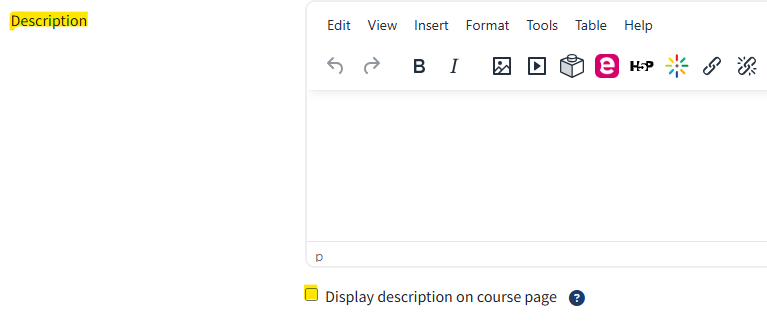
QMplus description box
Design with scanning in mind
Students on QMplus aren't passive readers - they're constantly scanning, prioritising, and filtering. By using the Baseline Standards, we can make our courses easier to navigate, more supportive of independent study, and hopefully more engaging for students.
/filters:format(webp)/prod01/channel_262/queen-mary-university-of-london/media/qmul/media/news/items/pr/SML-badge-large.png)
 News story: