
Student Feedback - Evasys
Student Feedback
To view your student feedback via EvaSys:
The link to access the EvaSys platform: https://qmul.evasysplus.co.uk/
Your log in details will be sent to you in a separate email by the QA team.
You will receive an email to alert you when surveys are closed and feedback is ready for you to view. Once you have logged in you will be able to view all student feedback pertaining to your practice.
Survey data will include:
- view the final response rate for each closed survey;
- review student aggregated feedback to quantitative questions, and view the free-text qualitative comments (data generated into a pdf document)
- Closed surveys
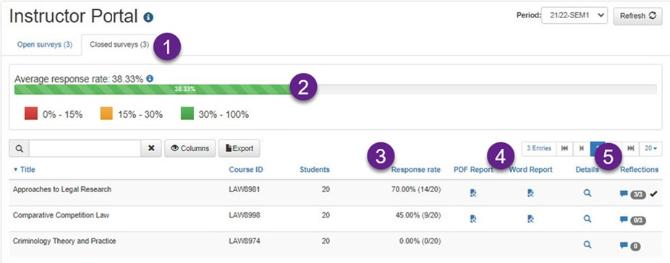
Figure 1: Click on “Closed surveys” [the default is “Open”]
Figure 2: Shows the average response rate across all your surveys for that survey period
Figure 3: Shows response rates for each survey
Figure 4: Access the Feedback Reports containing aggregated quantitative and free-text responses in the pdf document.